
AI lets operators build internal tools quickly. Learn how to choose the right level of build, weigh building against buying, and create governance that helps tools last.
This piece is adapted from an Operators Guild Focus Session on building with AI for non-engineers, featuring Miles Gullingsrud, Rob Owen, and David Campos, and shaped by a live discussion among operators who are actively building internal tools, standing up governance, and untangling the tradeoffs inside real companies.
Focus Sessions are small-group, member-only conversations where operators compare notes on decisions in flight, pressure-test tradeoffs, and surface the operational realities that rarely show up in polished frameworks.
If you want access to sessions like this, including the recordings and the community behind them, you can apply to join OG.
The first wave of AI at work helped people move faster inside the tools they already used. Now operators are starting to make the tools themselves.
A CFO can reshape a messy dashboard into an AI spend monitor built around the questions she asks. A finance analyst can create a platform connecting strategic initiatives to company metrics. Operations teams can turn onboarding spreadsheets, asset trackers, and close checklists into focused internal apps.
Building no longer requires waiting for a project to make it onto an engineering roadmap. But the ability to create software quickly introduces a new set of decisions:
- What should you build?
- How far should you take it?
- Who will use it?
- Who will own it?
- What happens when it breaks?
- What happens when the person who built it leaves?
Four ways AI creates value in a business
AI creates value across four related areas:
- Personal productivity: You use AI to help with your own work.
- Workflow automation: AI helps run a process that extends beyond one person, often with people reviewing or approving its work.
- AI in a product: AI becomes part of software used by employees or customers.
- Building with AI: Tools such as Claude Code and Cursor help people create those automations and products.
Building with AI has changed who gets to create software.
An operator who understands a workflow can describe the problem, make product decisions, work through the requirements with an AI tool, and produce something functional. That opens the door to projects that would never have received traditional engineering resources.
But “building with AI” covers a wide range. It can mean writing reusable instructions for an AI assistant or deploying software the entire company relies on.
Those projects require very different levels of investment and oversight.
.png)
Six levels of building internal tools with AI
A useful way to evaluate an AI build is to place it on a six-level ladder.
The lower levels are primarily text-based and hosted through outside AI platforms. The higher levels involve code, internal infrastructure, and broader organizational ownership.
Text-based and externally hosted tools
- Skills: Reusable instructions for completing a task or following a workflow.
- Artifacts: Persistent, app-like outputs such as dashboards and interactive tools.
- Connected information systems: AI systems connected to live tools such as an HRIS, CRM, or calendar.
Code-based and internally hosted tools
- Locally run apps: Single-purpose tools, often built by and for one person.
- Enterprise-hosted AI apps: Software built by a business user but deployed and governed like a traditional company application.
- AI-enabled internal tooling: Tools built with product and engineering support, using AI during development and inside the finished product.
TMoving up the ladder adds capability, but it also increases the requirements for security, testing, documentation, maintenance, and ownership. The biggest shift happens when a personal tool becomes infrastructure other people depend on.
Two examples of operator-built AI tools
The right level of investment depends on the tool’s audience, importance, and cost of failure.
Two examples show how different that decision can look.
Example one: An AI spend-monitoring artifact
The need
A CFO needed faster visibility into growing AI spend and clearer signals when costs required attention.
The underlying data already existed in a Metabase dashboard, but it was not organized around the questions she regularly asked.
The build
She used Claude to read the dashboard and created an artifact that restructured the data around her needs. It also surfaced events that required a response, including automations that were generating costs without their owners realizing it.
The artifact became a primary tool for monitoring AI usage.
Why it worked
- It was quick to build.
- It required no new infrastructure.
- It used data the company already had.
- It solved a clearly defined executive need.
- It did not require a traditional product-development cycle.
The limitations
- Access was managed manually.
- It could only use data available through the browser.
- Knowledge of the tool lived mostly with one person.
- Continuity and security depended on the CFO.
- It would be difficult to govern or scale across the company.
For a focused need, those tradeoffs may be reasonable. They become more concerning when a larger group starts treating the artifact as an official company system.
Example two: An enterprise strategy platform
The need
The company wanted one place to connect key metrics with the initiatives intended to move them.
Teams needed to add updates, report status, and drill into progress across the organization.
The build
A finance analyst worked with the COO to build a strategy initiatives platform using voice-to-code tools.
Because the application connected to the company’s data warehouse and would be used across teams, the project required support from security, IT, infrastructure, analytics, product, and engineering.
Why it worked
- It was tied to live company metrics.
- Access could be governed across departments.
- The system could support multiple teams and use cases.
- Ownership could transfer beyond the original builder.
- The application was durable enough for all-hands and board reporting.
The limitations
- It took longer to build than an artifact.
- The data warehouse required additional work.
- Deployment required formal security and infrastructure reviews.
- The project needed significant stakeholder buy-in.
The higher level was justified because the company planned to depend on the tool.
A personal dashboard and a board-reporting platform might begin with similar prompts. They are still very different products.
Should you build or buy an internal AI tool?
AI has made building faster and cheaper, but the basic build-versus-buy decision remains.
The analysis also needs a third word: maintain.
When buying software makes sense
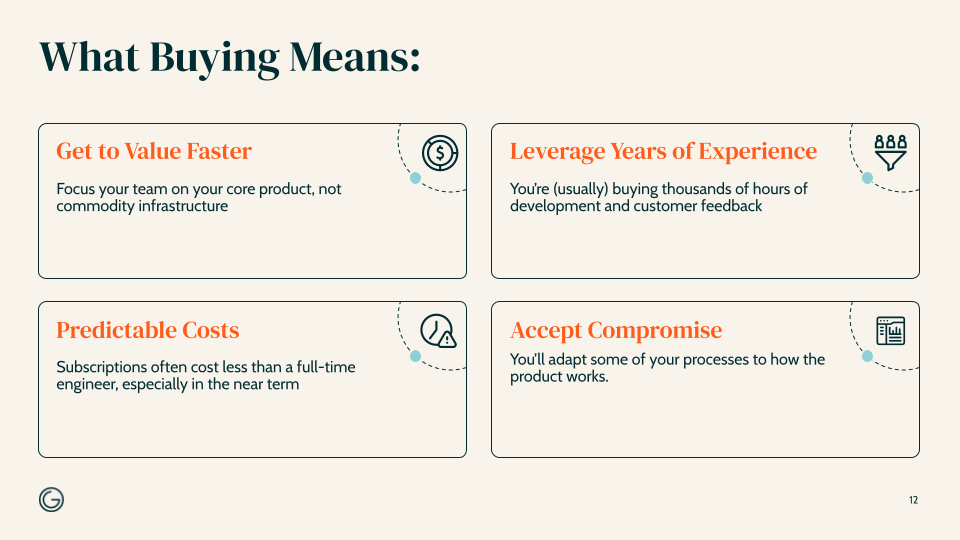
Buying may be the better choice when:
- You need to get to value quickly.
- The workflow is common across many companies.
- A vendor has already invested heavily in development, testing, and customer feedback.
- Your team should stay focused on its core product.
- Predictable costs and vendor support matter.
- A close fit is good enough, even if the product does not match every preference.
Buying means accepting some compromise. Your team may need to adapt its process, work around product limitations, or pay for features it does not need.
In exchange, someone else owns much of the infrastructure, support, security, and product roadmap.
.png)
When building software makes sense
Building may be the better choice when:
- The workflow is highly specific to your company.
- Existing products cannot support an important requirement.
- The tool could create meaningful operational or competitive value.
- The people closest to the problem can define the solution clearly.
- You have a long-term owner.
- Your company can support security, maintenance, and future updates.
Building gives you a strong fit for the way your company operates today.
The risk is that “today” changes.
Every feature becomes something the company must own, secure, document, support, and update. Technical debt still compounds. A quick internal solution can become a legacy system, especially when the original builder moves on.
The underlying AI platforms change, too. A model update, integration change, or hosting decision can break a setup that previously worked.
AI can compress the initial build. It does not remove the product lifecycle.
Questions to ask before you build
Run through these questions before committing:
- Who owns the tool after launch?
- What happens if the original builder leaves?
- Who is responsible for security, compliance, and uptime?
- How will permissions be managed?
- Can ownership transfer without rebuilding the system?
- What happens when a model, platform, or integration changes?
- Are you creating valuable differentiation or postponing a buying decision?
- Can you retire the tool later?
- Who fixes it when it fails during a critical business moment?
- Could a vendor provide the same capability more cheaply next year?
The larger the audience and the cost of failure, the more important these questions become.
Good first projects for building with AI
Many useful operator-built tools begin with familiar, bounded workflows.
Spreadsheet-based processes are often strong candidates. The operator already understands the inputs, outputs, decisions, exceptions, and people involved.
Good first projects often have:
- A clearly defined user
- A repeatable workflow
- Known inputs and outputs
- Data the builder understands
- A limited cost of failure
- A process currently managed through spreadsheets, forms, or manual handoffs
Examples include:
- HR onboarding
- IT asset tracking
- Sales objection training
- OKR reporting connected to Slack
- Financial close management
- Weekly business reviews
- FP&A workflows connected to NetSuite
- Internal training tools
- Focused reporting dashboards
A good early build has one clear job. Its audience is known. Its data requirements can be explained. If it fails, the result is inconvenient rather than catastrophic.
As the scope expands, the operating model should expand with it.
How to create AI governance for internal tools
The first stage of AI adoption is often helping people become comfortable enough to try the tools.
Once that happens, experimentation spreads quickly. Employees start connecting company data, using API keys, generating code, and deploying tools without always understanding the risks.
A policy document or FAQ rarely solves the problem on its own.
A better approach is a golden path: a set of opinionated defaults that makes the safe, supported way of building the easiest path to follow.
A strong golden path answers five questions:
- Which tools should I use?
- Where should the code and documentation live?
- How should company data be accessed?
- What checks must happen before deployment?
- Where do I go when I need help?
Choose default tools
Everyone should begin with the same approved stack.
A company might standardize on:
- Claude for building
- GitHub as the source of truth for code
- Vercel for deployment
- Cloudflare for protected internal access
- One approved database
- A model gateway for tracking AI spend
- An MCP for data discovery
- A traditional API for deployed data access
The exact tools will differ by company. The goal is to remove dozens of infrastructure and security decisions from every new project.
A builder should not have to choose a database, hosting platform, access model, and deployment process each time they have an idea.
Create repeatable development patterns
Standard tools are only the beginning. Builders also need a repeatable way to work.
One useful development pattern is:
Kickoff → work locally → check → deploy
Inside the building phase, use a smaller loop:
Plan → code → test
This helps non-engineers borrow the discipline experienced developers bring to a project.
The company can also turn its FAQs, standard operating procedures, templates, and security requirements into reusable skills and hooks. That puts guidance directly inside the workflow rather than leaving it in a document someone has to remember to read.
Build an internal community
A golden path also needs people.
Useful support structures include:
- Builder enablement channels
- Separate governance channels for IT, security, and finance
- Office hours
- Internal hackathons
- All-hands show-and-tells
- A shared skills library
- Written implementation guides
- A bot that helps surface answers in the enablement channel
People need to see what others are building, learn from their work, and know where to go when they are stuck.
A standard stack without support can become another ignored FAQ.
Skills vs. hooks in AI development
Skills and hooks both help standardize how people build, but they serve different purposes.
Use a skill when you want to:
- Give the model reusable instructions
- Define a workflow
- Share company standards
- Review work against a policy
- Reduce repeated prompting
- Guide planning or code review
- Tell the model which questions to ask before starting
A skill might guide a discovery process, create a project plan, review code, or check whether a build follows company standards.
The AI system reads the skill when it decides the instructions are relevant.
Use a hook when you need to:
- Run a check automatically
- Enforce a non-optional rule
- Scan code for exposed secrets
- Validate work before deployment
- Confirm that an environment is configured correctly
- Remove the decision from the model
A secrets hook, for example, can check for sensitive information every time code is committed. If it finds an exposed API key, it stops the process.
That is more reliable than asking the model to remember not to expose secrets.
Skills guide the model. Hooks enforce the controls that cannot be optional.
How non-engineers can build more reliable AI tools
A new builder might begin with:
“I want to build an OKR app. Can you do it?”
An experienced developer arrives with many more decisions already made. They have opinions about the interface, data, permissions, integrations, users, and expected behavior.
The difference is the amount of thinking that happens before the code.
Operators already bring this kind of judgment to finance, people, operations, and strategy. Building with AI requires making those opinions explicit.
Before building
- Define the problem and intended user.
- Describe the workflow from beginning to end.
- List the required data and integrations.
- Decide how access will be controlled.
- Identify sensitive data.
- Document expected behavior and likely failure cases.
- Choose the approved tools and infrastructure.
- Decide who will own the tool after launch.
During the build
- Create a plan before generating code.
- Review the plan before implementation.
- Work in small, testable stages.
- Write tests for important workflows.
- Add checkpoints before the model reaches its context limit.
- Save key decisions outside the chat.
- Ask the model to stop and raise questions when it encounters ambiguity.
- Review generated work rather than assuming it is correct.
Before deployment
- Test the core workflows.
- Run security and secrets checks.
- Confirm user permissions.
- Document integrations and dependencies.
- Define support and escalation responsibilities.
- Make sure another person can understand the project.
- Confirm that ownership can transfer.
Upfront planning may feel slow when AI can generate something immediately. That planning is also what makes faster, more reliable execution possible later.
How to keep internal AI tools maintainable
The person who builds a tool often knows every decision behind it.
That becomes a problem when the person takes a vacation, changes roles, or leaves the company.
Maintainability depends on documentation, shared ownership, and cost visibility.
Document for the next owner
The next person should be able to answer:
- Where does the code live?
- How is the tool structured?
- Which systems does it connect to?
- How are permissions managed?
- What decisions have already been made?
- How is it tested?
- How is it deployed?
- What should someone check when it breaks?
GitHub can serve as a shared source of truth for code, project requirements, plans, reviews, integration standards, and operating instructions.
That creates cleaner handoffs between people, work sessions, and AI systems. A teammate can pick up an issue without requiring the original builder to explain the entire project.
The tool is only as transferable as the knowledge around it.
Control AI development costs
Runaway AI spending often comes from behavior rather than the price of the tools themselves.
Long-running conversations can become especially expensive because each interaction carries the previous context forward.
Useful cost controls include:
- Use mid-tier models for routine implementation.
- Reserve larger models for architecture and complex planning.
- Ask the planning model to create detailed specifications for a cheaper implementation model.
- Start fresh sessions instead of carrying unlimited context forward.
- Add checkpoints before agents run for long periods.
- Turn repeated instructions into skills or subagents.
- Track spending by project and business purpose.
- Monitor unattended automations.
- Review what the spending produced, not only the number of tokens used.
A costly workflow that produces meaningful business value may be worthwhile. An unattended automation consuming resources without producing useful work needs intervention.
Cost management belongs inside the same golden path as security, documentation, and deployment.
Make the safe way the easy way
Operators can now create tools that once would have required a product manager, a team of engineers, and a place on the company roadmap.
That creates room for better dashboards, faster workflows, more useful internal systems, and ideas that otherwise would never get built.
It also moves product and technology decisions into new parts of the organization.
Companies need clear lanes:
- Quick artifacts can serve individual needs.
- Small apps can improve bounded workflows.
- Enterprise systems can receive the infrastructure, review, and ownership they require.
The golden path connects them. It gives people room to build while making security, documentation, testing, cost management, and handoffs part of the process from the beginning.
The opportunity is real. So is the ownership. The strongest operator-builders understand both.
Join the conversations operators are having now
This piece was adapted from an Operators Guild Focus Session, where senior operators compared real tools, governance systems, costs, and lessons from building inside their companies.
OG members get access to Focus Sessions like this one, including the live discussion, recordings, working examples, and the community continuing the conversation afterward.
Apply to join Operators Guild and be part of the room.